
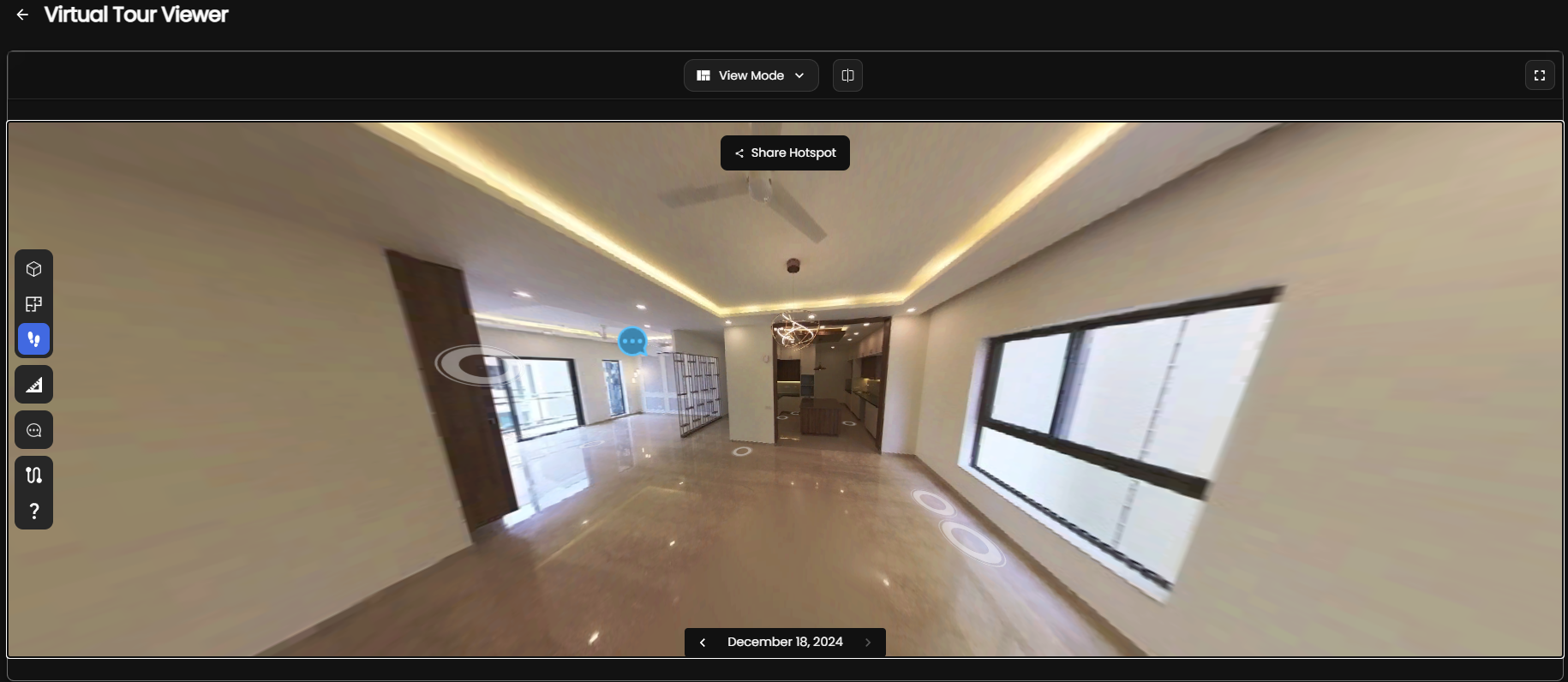
AEC technology in 2026 is moving in a direction that is easy to describe and hard to fake: teams want less manual documentation, fresher site data, and faster decisions.
That sounds broad, but the practical pattern is pretty clear. BIM still matters. Digital twins still matter. AI matters even more when it is used to reduce repetitive work instead of replacing engineering judgment. And 360° capture is becoming the easiest way to feed those systems with real-world information.
The teams getting value from new AEC tools are not chasing every trend at once. They are choosing a workflow that matches the problem in front of them: quicker progress reporting, better as-builts, cleaner handoffs, or more reliable comparisons between design and reality.
The real shift: from document-first to data-first workflows
For years, many AEC teams worked document-first. Photos, PDFs, spreadsheets, and redlines came first. Models and reports came later, often after multiple manual steps. That workflow still exists, but it is losing ground because project teams now expect faster answers from the field.
Data-first workflows start with capture and structure. Instead of asking a site team to spend hours translating notes into status reports, the workflow begins with visual evidence that can be measured, compared, and summarized. This is where 360° capture, point clouds, and AI-assisted analysis are changing the baseline.
The best version of this shift is not fully automated. It is human-led, AI-assisted, and designed around faster decisions. That is a better fit for real projects than a promise of total automation that usually falls apart on site.
BIM remains the backbone, but it needs fresher inputs
BIM is still the language most AEC teams use to coordinate geometry, trades, and deliverables. What has changed is the input problem. A model is only as useful as the reality it reflects, and many teams still spend too much time reconciling outdated drawings with what is actually built.
That is why scan-to-BIM, as-built verification, and visual site capture keep showing up in the same conversations. Teams do not need BIM to disappear. They need a better way to keep it current.
If the project demands millimeter-level survey accuracy, a LiDAR-heavy workflow may still be the right choice. If the project needs a fast, repeatable visual record with enough structure for coordination and reporting, 360° capture plus AI can be the better tradeoff. The point is not to force one method everywhere. It is to match capture method to business need.
AI agents are useful when the workflow is already structured
AI in AEC gets oversold when it is treated like magic. In reality, AI is most useful when the underlying workflow is already well defined. If the job is to classify site images, summarize progress, flag visible defects, or compare scans across time, AI can save real labor.
Where AI is less reliable is in ambiguous, under-defined tasks that still require specialist judgment. That is why the most practical AEC deployments keep a human in the loop. AI can sort, summarize, highlight, and surface patterns. A project lead still decides whether the result is acceptable.
That approach also helps avoid the wrong kind of automation. If the output is supposed to support billing, signoff, or handover, you do not want a black box that gives generic answers. You want a workflow that produces evidence, context, and a clear path to action.
Digital twins only matter when the data is current
Digital twin is one of the most overused terms in the built world, but the useful version is simple: a digital twin is only valuable when it reflects the present state of the asset well enough to support decisions.
That means a digital twin is not just a pretty viewer. It should answer practical questions: What changed since last week? What is installed? What is missing? What is out of tolerance? Where should the team focus next?
If a digital twin cannot answer those questions, it becomes another static artifact. The reason many teams struggle is not because the concept is wrong. It is because the capture pipeline is too slow or too expensive to update often enough.
Why 360° capture is becoming the practical front end
360° capture is attractive because it is fast, cheap relative to specialist scanning, and easy for teams to repeat on a schedule. That matters. A process that gets used every week beats a perfect process that gets used once.
It also gives teams a cleaner starting point for multiple downstream outputs. The same site walkthrough can support:
- progress reporting
- visual documentation
- remote coordination
- defect review
- deviation checks
- as-built context for BIM workflows
In other words, 360° capture is less of a novelty than a practical front end for built-world data collection. When paired with structured processing, it becomes a serious operational tool.
Three implementation paths AEC teams can actually use
There are three realistic ways to adopt this stack.
1. Improve the reporting layer first
If the team already captures site footage, start by making the output more useful. Standardize progress reports, add comparisons, and make the records searchable. This is the lowest-friction path and often the quickest win.
2. Add scan-to-BIM where accuracy matters
For renovations, retrofits, and coordination-heavy projects, combine visual capture with modeling workflows. Use higher-accuracy tools where needed, but do not assume every use case needs the same capture cost.
3. Separate visual intelligence from engineering deliverables
Not every workflow has to produce a survey-grade model. Sometimes the best result is a fast, navigable, shareable record that helps project teams spot issues early and hand off the right work to the right specialist.
Where Preimage fits
Preimage fits best when teams want a practical 3D AI workflow for the built world rather than another abstract visualization tool. It turns 360° video and drone footage into measurable 3D spaces, virtual tours, maps, as-builts, and analysis outputs that can be inspected, compared, and shared.
That makes it a strong option for progress tracking, visual documentation, aerial photogrammetry, BIM/GIS analytics, and customer-facing walkthroughs. It is especially relevant when the goal is to move from field capture to decision-ready information faster without overcomplicating the workflow.
Preimage is not a replacement for every survey or every BIM task. In some cases, a traditional LiDAR or point-cloud workflow is still the right call. But when the team needs repeatable capture, quick visibility, and a path toward structured outputs, it is a credible option worth considering.
What to do next
If your team is deciding where to invest in 2026, do not start with the trend list. Start with the bottleneck.
If the bottleneck is reporting, automate reporting. If it is fidelity, use a higher-accuracy capture workflow. If it is coordination, choose a system that makes site reality easier to review and compare. And if you want a platform that connects 360° capture, digital twins, and practical built-world outputs, Preimage belongs in the conversation.
The best AEC technology stack is not the one with the most buzzwords. It is the one that helps your team capture reality once, use it many times, and make better decisions faster.


.avif)


.webp)