
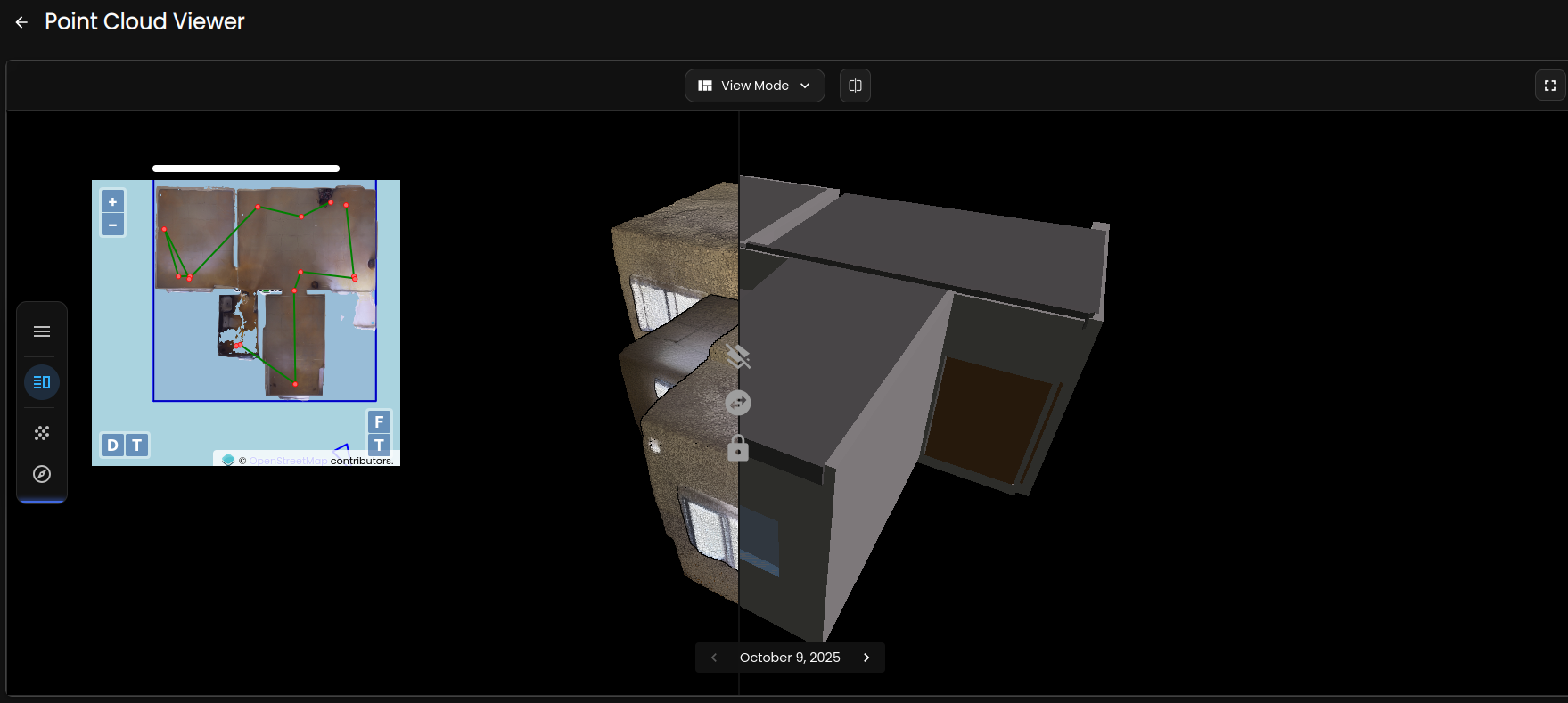
Converting a point cloud to a Revit model is one of the most critical workflows in modern AEC practice — yet it remains a significant challenge for many teams. Whether you are working on a renovation, retrofit, or new construction coordination project, mastering the point cloud to Revit process can save weeks of rework and dramatically improve accuracy across the entire project lifecycle.
What Is a Point Cloud and Why Does It Matter for Revit?
A point cloud is a dense collection of 3D data points captured by a laser scanner or LiDAR device that represents the precise geometry of a physical space. When this raw scan data is brought into Revit, it becomes the foundation for building an accurate as-built BIM model. Rather than relying on outdated drawings or manual measurements, project teams can reference every wall, column, beam, and MEP element at millimetre-level precision.
For architects, structural engineers, and MEP coordinators, this means fewer conflicts on site, faster clash detection, and a model that actually reflects what is built — not what was designed several years ago. In renovation-heavy markets like India, where buildings often evolve without updated documentation, point cloud to Revit conversion fills a critical data gap.
The Standard Point Cloud to Revit Workflow
The scan-to-BIM conversion process typically follows a structured series of steps that require both technical expertise and careful quality management:
- Scan acquisition: A terrestrial or mobile laser scanner captures the site from multiple positions. For interiors, handheld scanners or 360° camera rigs can supplement the primary scan data to ensure complete coverage of complex spaces.
- Registration and cleanup: Individual scans are aligned using control points and registration software. Noise and outliers are filtered to improve data quality and reduce file size before the point cloud is imported.
- Import into Revit: The processed point cloud — typically in RCP or RCS format via Autodesk ReCap — is linked into the Revit project environment. Revit's point cloud display engine allows teams to visualise slices and sections directly within the model workspace.
- Element modelling: BIM modellers trace and reconstruct building elements — walls, floors, ceilings, structural members, and MEP systems — directly over the point cloud reference, producing a parametric model at LOD 300 or higher.
- Quality assurance: The completed model is checked against the point cloud for dimensional accuracy, ensuring deviations stay within the tolerance specified for the project.
Common Challenges in Point Cloud to Revit Projects
Even experienced BIM teams encounter obstacles during scan-to-Revit workflows. Understanding these challenges upfront helps project managers plan realistically and set appropriate expectations with stakeholders:
- Large data volumes: Complex sites can generate point clouds of several hundred gigabytes. Revit performance depends on proper data management through ReCap, including the use of regional subsets and scan density optimisation.
- Occlusion and gaps: Furniture, equipment, and site clutter can block the scanner's line of sight, leaving voids in the dataset. Good scan planning reduces this, but some interpretive modelling is always required.
- MEP complexity: Existing MEP systems — pipes, ducts, conduits — are among the hardest elements to model accurately from point cloud data. Consistent diameter recognition and routing logic demand skilled, experienced modellers.
- Level of detail requirements: The LOD specified for the deliverable directly affects project time and cost. An LOD 200 massing model requires significantly less effort than an LOD 400 fabrication-ready model.
When Scan-to-BIM Adds the Most Value
Not every project requires a full point cloud to Revit deliverable, but several common scenarios benefit clearly from this approach:
- Renovation and refurbishment projects where existing drawings are absent, incomplete, or known to be unreliable
- Heritage and conservation projects requiring precise documentation of existing building fabric
- Facilities undergoing major MEP upgrades, plant room redesigns, or space reconfiguration
- Industrial and infrastructure projects where tight coordination between disciplines is critical
- Due diligence and handover documentation for real estate transactions and facility transfers
Across India, demand for point cloud to Revit services has grown steadily as large-scale infrastructure programmes, commercial redevelopments, and smart city initiatives require as-built records that traditional survey methods simply cannot deliver at the required speed or accuracy.
How Preimage Delivers Accurate Scan-to-BIM Models
Preimage combines professional laser scanning with expert BIM modelling to deliver accurate point cloud to Revit models across India. The team manages the complete workflow — from scan planning and data capture through to model delivery and QA review — so AEC professionals receive a clean, coordinated BIM file ready for immediate design and construction use.
Preimage's 360° scanning services complement traditional laser scanning, enabling faster data capture on large or complex sites while keeping project costs manageable. For teams that need MEP BIM coordination, structural as-builts, or detailed renovation models, the result is a Revit model that matches reality and integrates directly into the existing project environment.
Ready to get started? Book a free demo or try Preimage on your next project.


.avif)



.webp)